Network security is the set of technology, policies and processes that protect a network, the traffic on it and the resources reachable through it from unauthorized access and misuse. The basics come down to five habits: know what you are protecting, give every user and system the least access it needs, split the network into segments, protect data in transit, and keep logs you actually read. This guide explains each one in order, then shows you how to practice them with exercises and self-check questions.
TL;DR
- Network security protects the confidentiality, integrity and availability of data, in transit and at rest.
- Start with risk: list your assets, identify threats and vulnerabilities, then pick controls that reduce them.
- The core controls are firewalls, identity and access management, segmentation, encryption, updates, backups and monitoring.
- Reading about security is not enough. Build small topologies, write rules, break them and read the logs.
- Finish with practice questions to find the gaps in your understanding.
Table of Contents
- What network security means
- Threats, vulnerabilities and risk
- The core controls
- A starter checklist for a small network
- How to practice network security
- Where network security fits in your learning path
- Promo: practice on a real topology
- Perspective: why practice beats reading
- FAQ
- Sources
What network security means
A network moves data between devices. Network security makes sure only the right people and systems can use that network, that the data on it is not read or altered on the way, and that services stay available. AWS describes it as the technology, policies and processes that protect an organization’s data, workloads and cloud infrastructure from unauthorized access and misuse. Palo Alto Networks adds that it must also give authorized users the appropriate level of access.
The professional engineering view is broader than a firewall at the edge. IEEE frames network security as protecting the confidentiality, integrity and availability of data in transit and at rest, using policies, hardware, software and protocols to prevent unauthorized access, detect malicious activity and recover from attacks. It also notes that modern practice extends past perimeter firewalls to encryption, authentication, intrusion detection, VPNs and DDoS mitigation, because organizations depend on interconnected systems.
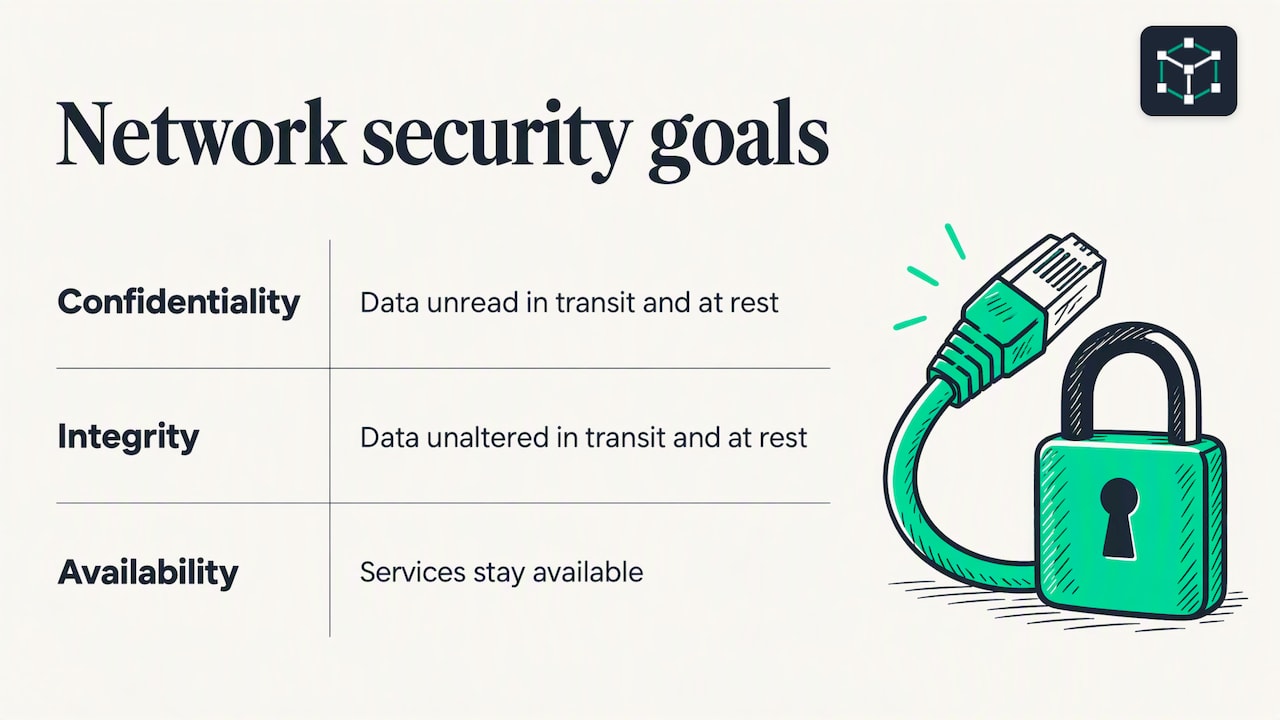
The CIA triad
Three properties anchor every decision you make:
- Confidentiality: only authorized parties can read the data. Encryption and access control serve this goal.
- Integrity: data is not changed without detection. Hashing, digital signatures and change control serve this goal.
- Availability: services work when users need them. Redundancy, patching and DDoS protection serve this goal.
When you evaluate any control, ask which of the three it supports. A firewall rule that blocks Telnet protects confidentiality. A backup protects availability. A signed firmware image protects integrity.
Why it matters
Weak network security has concrete costs. TechTarget lists operational disruption, exposure of personally identifiable information, intellectual-property theft, reputational harm, legal risk and regulatory consequences. It also reports that IBM’s Cost of a Data Breach Report 2024 put the average breach cost at $4.88 million, up from $4.45 million in 2023.
Threats, vulnerabilities and risk
Beginners often use these three words interchangeably. They are different, and the difference drives every design choice.
| Term | Meaning | Example |
|---|---|---|
| Threat | A person, object or event that could cause damage | An attacker scanning for open ports, a failed disk, a flood |
| Vulnerability | A weakness a threat can exploit | An unpatched router, a default password |
| Risk | The likelihood and impact of a threat exploiting a vulnerability | A default password on an internet-facing device |
NIST’s LAN security guideline defines a threat as a person, object or event that could cause damage, and says threats can be malicious, accidental or natural. It defines a vulnerability as a weakness that a threat can exploit, and explains that reducing vulnerabilities reduces the risk of threats. You rarely control the threats. You can control the vulnerabilities.
The same document gives a simple risk process: identify your assets, identify the threats and vulnerabilities specific to your environment, assess the risk, then select security services and mechanisms that reduce it. A home network and a hospital network share the same tools but need different choices, because their assets differ.
Common attack types to recognize
- Eavesdropping and sniffing: capturing traffic that is not encrypted.
- Spoofing: forging an IP address, MAC address or DNS answer.
- Denial of service: exhausting a link, device or application so legitimate users cannot connect.
- Port scanning and reconnaissance: probing for open services before an attack.
- Lateral movement: an attacker who has compromised one host moves to others on the same network.
- Credential attacks: guessing, stealing or reusing passwords.
Lateral movement is the one beginners underestimate. CISA notes that segmentation and restricted lateral movement reduce an attacker’s ability to pivot after an initial compromise. That is the reason a flat network, where everything can talk to everything, is a weak design.
The core controls
Security is built in layers, so that one failure does not expose everything. AWS lists the typical layered controls: firewalls, identity and access management, network segmentation, detection tools, updates, backups and response plans. Here is what each one does in practice.
Design the architecture early
The UK National Cyber Security Centre says an appropriate network architecture can make compromise harder, limit the impact of compromise and make malicious activity easier to detect. Retrofitting security onto a poorly planned network is slower and more expensive than drawing the zones correctly at the start. Typical zones are user devices, servers, management interfaces, guest Wi-Fi and a DMZ for public-facing services.
Apply least privilege
The NCSC recommends least privilege: users and systems get only the resources they need for their work. In practice:
- Give each person an individual account, never a shared one.
- Remove administrator rights from daily-use accounts.
- Limit which hosts can reach management interfaces such as SSH.
- Review access when someone changes role or leaves.
Segment the network
Segmentation splits a network into zones with controlled paths between them. On switches you do it with VLANs. Between VLANs, a router or firewall decides which traffic passes. A guest VLAN that can reach the internet but not the file server is the classic example.
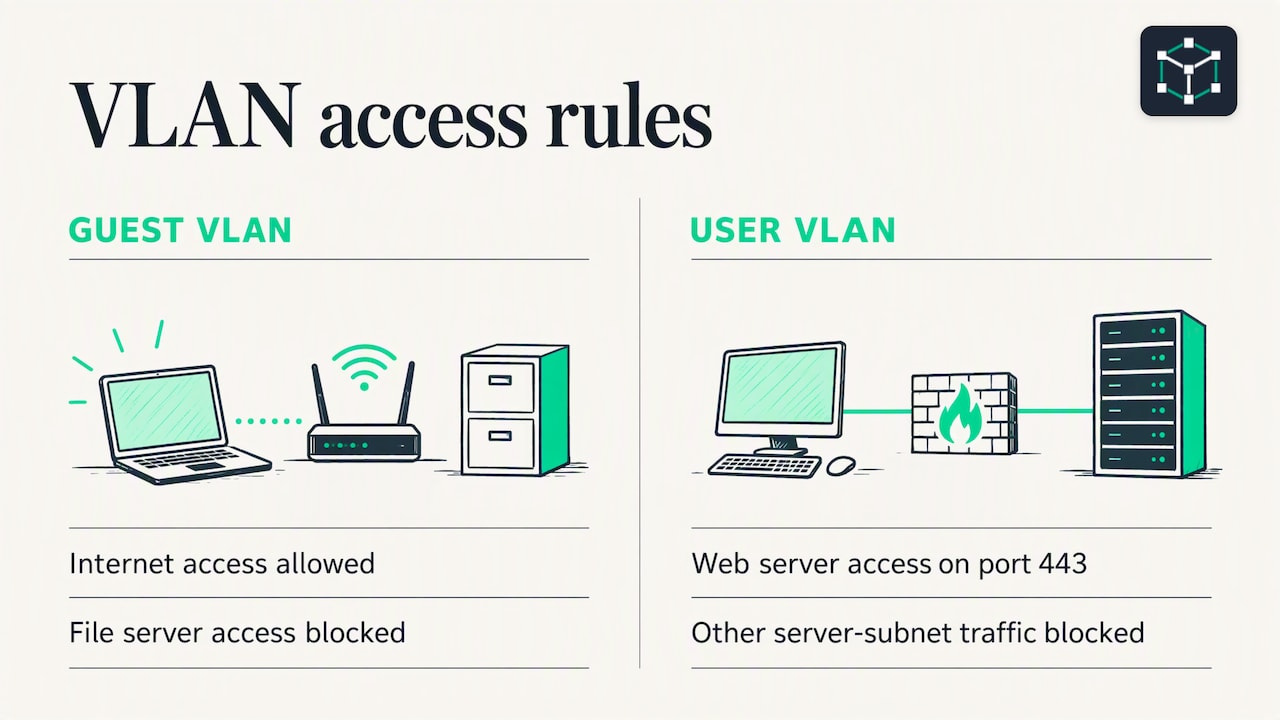
On a Cisco-style router or layer 3 switch, an access control list (ACL) enforces that decision. This extended ACL lets the user VLAN reach a web server on port 443 and blocks everything else toward the server subnet:
ip access-list extended USERS-TO-SERVERS
 permit tcp 10.10.10.0 0.0.0.255 host 10.10.20.5 eq 443
 deny ip any 10.10.20.0 0.0.0.255
 permit ip any any
!
interface Vlan10
 ip access-group USERS-TO-SERVERS in
Read it top to bottom. The first matching line wins, and every ACL ends with an implicit deny. Order mistakes are the most common ACL bug, so test with a ping and a connection attempt from both sides.
Protect data in transit
Assume anyone on the path can read unencrypted traffic. Use HTTPS instead of HTTP, SSH instead of Telnet, and a VPN for remote access to internal resources. Disable legacy protocols you do not need. The NCSC guidance lists protecting data in transit as its own area of network security fundamentals.
Keep systems updated
Unpatched devices are the easiest vulnerabilities to remove. Keep an inventory of devices and firmware versions, since you cannot patch what you do not know exists. CISA’s joint guidance recommends maintaining asset and firmware inventories as part of hardening.
Monitor and log
Prevention fails sometimes. Monitoring is how you notice. The same CISA guidance recommends centralized secure logging, off-site copies of logs, monitoring for account anomalies and establishing a baseline of normal network behavior. A baseline matters because an alert like “unusual traffic” means nothing until you know what usual looks like.
CISA’s network security management fact sheet groups the capabilities into boundary protection, event management, continuous monitoring and improvement, and designing security into systems. Treat that list as a checklist for any network you manage.
Accept that controls are tailored
NIST’s control catalog describes its controls as flexible and customizable, applied within an organization-wide process to manage risk. You do not need every control. You need the ones that match your assets and threats.
A starter checklist for a small network
Use this for a home lab, a small office or a study environment:
- Change every default password and disable unused accounts.
- Enable the firewall on routers and hosts, and deny inbound traffic by default.
- Put guests and IoT devices on their own VLAN or SSID.
- Use WPA2 or WPA3 for Wi-Fi, with a long passphrase.
- Turn off Telnet and HTTP management; use SSH and HTTPS.
- Update router, switch and access point firmware.
- Back up configurations and test a restore.
- Send logs to one place and look at them weekly.
How to practice network security
Concepts stick when you apply them. A good practice routine moves from reading to building to breaking.
Hands-on exercises
Each of these needs only a simulator, virtual machines or lab software:
- Build two zones. Create two VLANs, a router between them and a host in each. Confirm they can ping each other.
- Block between zones. Write an ACL that allows only one service across the boundary. Verify that the allowed traffic passes and everything else fails.
- Lock down device management. Configure SSH, create a local user, disable Telnet and restrict VTY access to one management subnet.
- Secure a switch port. Enable port security with a maximum MAC count, then connect a second device and observe the violation action.
- Capture and read traffic. Use a packet analyzer to compare an HTTP request with an HTTPS one. Note what is readable in each.
- Find the open ports. Scan a lab host you own, then close one service and scan again.
- Read your logs. Generate failed logins, then find them in the device log. Practice writing down what normal looks like.
Only scan or test systems that you own or have written permission to test. Our acceptable use terms set the same expectation for our platform.
Self-check questions
Try answering these without notes, then look up what you missed:
- What is the difference between a threat and a vulnerability?
- Which part of the CIA triad does a backup protect?
- Why does an ACL end with an implicit deny, and why does line order matter?
- What does segmentation limit after one host is compromised?
- Why is SSH preferred over Telnet?
- What is a baseline, and why do monitoring tools need one?
- Which control would you add first to a flat network, and why?
For structured practice, certification-style quizzes help. TechTarget’s CISSP Domain 4 quiz is one example: it mixes multiple-choice and true-or-false questions on network architecture, components, communication channels, attacks, the OSI model, VPNs and firewall functions. That topic list is a good map of what to study next.
Where network security fits in your learning path
Security makes sense only on top of networking fundamentals. You cannot write a useful ACL without understanding subnets, or reason about spoofing without knowing how ARP and DNS work. A sensible order is:
- IP addressing and subnetting.
- Switching, VLANs and routing.
- Common protocols and ports: DNS, DHCP, HTTP, SSH, TLS.
- Security controls: ACLs, port security, VPNs, firewalls, wireless security.
- Monitoring and troubleshooting.
This is also the order that CCNA and CompTIA Network+ study follows, with security as one domain alongside the rest.
Promo: practice on a real topology
If you are learning these topics for CCNA or Network+, we built Subnetica around short lessons, quizzes and labs. Lessons are free and unlimited. Labs are designed to be realistic and are graded automatically, so you get feedback on a configuration without waiting for a person to check it.
The learning path uses spaced repetition and learns from your mistakes, so questions you miss come back for review. When you are ready to test yourself under exam conditions, there is a paid option for unlimited practice exams. Start with the free lessons and work toward the labs.
Perspective: why practice beats reading
Most people can recite the CIA triad and still misconfigure an ACL. The gap is not knowledge but repetition under feedback.
We design Subnetica around that gap. Lessons are bite-sized so you can finish one in a sitting. Quizzes check recall right away. Labs make you type the configuration and grade the result automatically, so a wrong wildcard mask shows up as a failed test, not a silent mistake.
The data-driven learning path then does what a good tutor does. It notes what you got wrong, schedules those topics for spaced review, and shapes a plan toward your goal, whether that is CCNA, Network+ or simply understanding your own network.
Security is a skill of details: line order, subnet boundaries, which port. Free, unlimited practice lets you rehearse those details until they are automatic.
Subnetica
FAQ
What are the three basic goals of network security?
They are confidentiality, integrity and availability, known as the CIA triad. Confidentiality keeps data from unauthorized readers, integrity keeps it from undetected change, and availability keeps services usable. IEEE’s description of network security uses these same three properties.
Where should a beginner start with network security?
Start with networking fundamentals: addressing, VLANs, routing and common protocols. Then learn least privilege, segmentation, encryption and logging. Practice each in a simulator or virtual lab before moving to more advanced tools.
What is the difference between a firewall and an ACL?
Both filter traffic by rules. An ACL is a simple ordered list of permit and deny statements, often on a router or switch. A firewall usually adds features such as tracking connection state and inspecting applications. Learn ACLs first, because the logic of ordered rules carries over.
How do I practice network security without real equipment?
Use network simulators and virtual machines. Build small topologies, write ACLs, configure SSH, capture traffic and read logs. Test only systems you own or have permission to test.
Is network security the same as cybersecurity?
No. Cybersecurity is the wider field, covering applications, endpoints, identity, data and people. Network security is the part focused on the network: its devices, traffic and access paths.
Sources
- What is Network Security? (AWS)
- What is Network Security? (Palo Alto Networks)
- Network security (IEEE Technology Navigator)
- What is Network Security? Definition and Best Practices (TechTarget)
- Network security fundamentals (NCSC)
- NIST FIPS 191: Guideline for the Analysis of LAN Security
- NIST SP 800-53 Rev. 5
- Securing Network Infrastructure Devices (CISA)
- Enhanced Visibility and Hardening Guidance for Communications Infrastructure (CISA)
- Network Security Management Fact Sheet (CISA)
- CISSP Domain 4 quiz: Network security basics (TechTarget)