
A VLAN (virtual local area network) splits one physical switched network into several logical networks. Devices in the same VLAN share a broadcast domain. Devices in different VLANs do not, even when they plug into the same switch. This guide explains the concept, shows how frames are tagged and forwarded, and walks through a working configuration with verification commands.
TL;DR
- A VLAN is a Layer 2 broadcast domain that is partitioned and isolated from other VLANs, as NIST’s glossary defines it.
- Access ports carry one VLAN to an end device. Trunk ports carry many VLANs between switches using 802.1Q tags.
- Devices in different VLANs cannot talk directly. Traffic between them must be routed, for example through an SVI on a Layer 3 switch.
- Configuring a VLAN takes four steps: create it, assign access ports, set up the trunk, verify.
- A VLAN limits broadcasts and helps with access control. It is one layer of a security design, not the whole design.
Table of Contents
- What a VLAN is
- How VLANs work
- Access ports and trunk ports
- Why networks use VLANs
- How to configure a VLAN on a switch
- Configuring VLANs across multiple switches
- Can devices in different VLANs communicate?
- Our perspective
- Practice VLANs hands-on
- VLAN basics: a quick vocabulary
- Design habits that save time
- FAQ
- Sources
What a VLAN is
Start with the problem. On a plain switch, every port belongs to the same broadcast domain. When one host sends a broadcast, such as an ARP request, the switch floods it out of every other port. On a small network that is harmless. On a large one, the noise grows with every device you add, and every device can reach every other device at Layer 2.
A VLAN solves this by letting you divide the switch logically. NIST describes a VLAN as a broadcast domain partitioned and isolated at the data-link layer, which lets devices on one or more physical LANs communicate as though they shared one LAN while staying separate from other VLANs. Cisco’s IOS XE documentation puts it in similar terms: a logical grouping that segments a network into smaller broadcast domains, including across more than one physical switch.
A useful mental model: a VLAN is a virtual switch carved out of a physical one. Ports 1 to 12 can be one virtual switch, ports 13 to 24 another, and the two never exchange frames unless a router sits between them.
Two points follow from that definition:
- Physical location is not the boundary. Membership is logical, so a laptop on the third floor and a server in the data center can sit in the same VLAN. Juniper’s documentation notes that VLANs can group devices by department, function, device type or location regardless of where they are placed.
- VLANs usually map to IP subnets. Cisco’s Nexus documentation says VLANs are normally associated with IP subnetworks. One VLAN, one subnet is the standard design.
How VLANs work
The mechanism has two parts: how a switch decides which VLAN a frame belongs to, and how it keeps that identity when frames cross between switches.
Port membership and forwarding
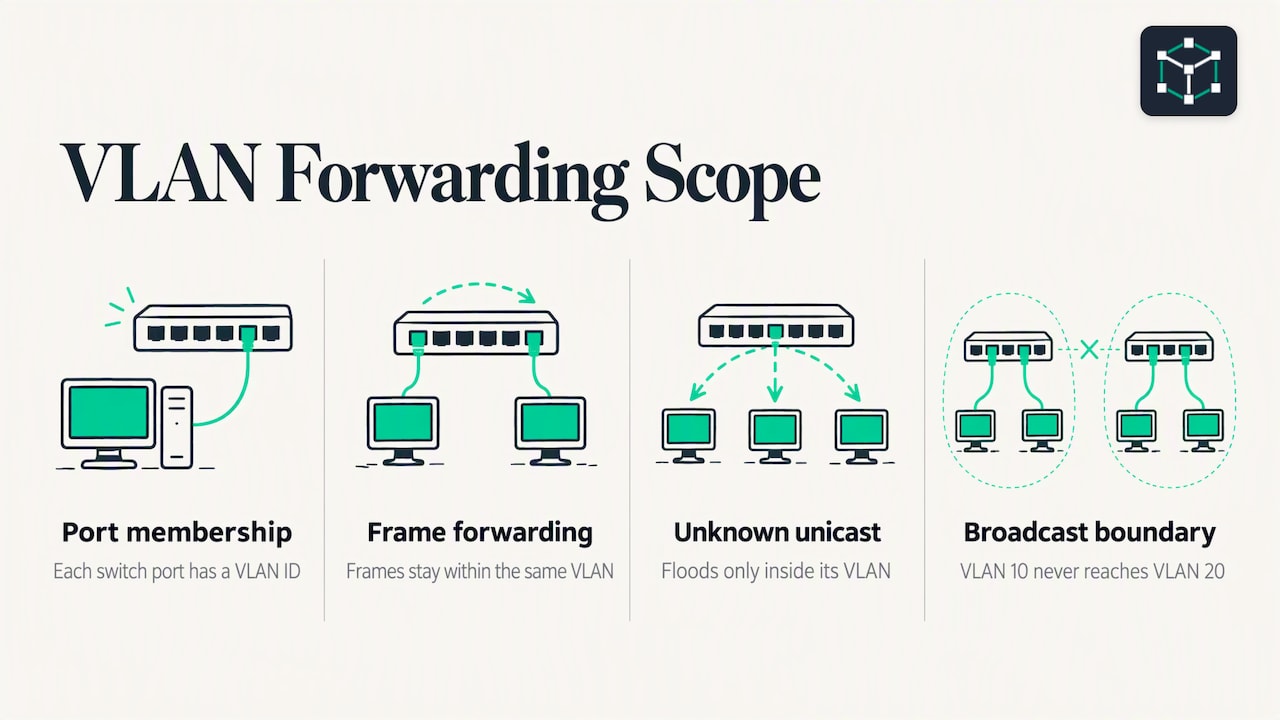
Each switch port is associated with a VLAN ID. A frame that arrives on a port is treated as belonging to that port’s VLAN. The switch then forwards it using its normal MAC address table, but only among ports in that same VLAN. Cisco states that unicast, broadcast and multicast traffic is forwarded or flooded only to end stations in the relevant VLAN.
That includes unknown unicast frames. If the switch does not know where a destination MAC lives, it floods the frame, but only inside the VLAN. This is the core behavior: each VLAN has its own flooding scope, and a broadcast in VLAN 10 never reaches a host in VLAN 20.
This simple form is called a port-based VLAN. TechTarget describes it as assigning a switch port to a VLAN, with the assignment changeable by an administrator or by automation.
802.1Q tagging
What happens when VLAN 10 spans two switches? The link between them must carry frames from several VLANs at once, and the receiving switch must know which VLAN each frame came from. The IEEE 802.1Q standard solves this by inserting a tag into the Ethernet frame header. The tag holds the VLAN ID.
TechTarget explains that VLAN IDs are carried in a 12-bit 802.1Q tag, which allows up to 4,096 VLANs in a switching domain. When the frame reaches the far switch, that switch reads the tag, removes it, and delivers the frame only to ports in the matching VLAN. Devices in different VLANs therefore stay in different broadcast domains, even over a shared cable.
The end host never sees the tag. Tagging happens only on links between network devices.
Access ports and trunk ports
Every VLAN design comes down to two port types.
| Port type | Carries | Tagged? | Connects to |
|---|---|---|---|
| Access | One VLAN | No | PCs, printers, servers, access points |
| Trunk | Multiple VLANs | Yes (802.1Q) | Other switches, routers, some servers |
An access port belongs to a single VLAN and sends and receives untagged frames. A trunk port multiplexes traffic for several VLANs on one link. Juniper states that 802.1Q tags identify VLAN traffic and that trunk ports multiplex traffic for multiple VLANs.
The textbook Computer Networks: A Systems Approach shows the same layout: host-facing links are access interfaces, while the inter-switch link is a trunk carrying multiple VLANs. One cable between switches replaces what would otherwise be one cable per VLAN.
The native VLAN
A trunk can also carry one VLAN without a tag. This is the native VLAN. Frames from the native VLAN cross the trunk untagged, and untagged frames that arrive on the trunk are placed into the native VLAN. If the two ends of a trunk disagree about which VLAN is native, traffic leaks between VLANs or gets dropped, and many switches log a mismatch warning. Cisco’s guidance for multi-switch setups is to make sure 802.1Q tagging and native VLAN settings agree on both ends.
A good habit: set the native VLAN on both ends deliberately, and keep it unused by end devices.
Why networks use VLANs
Cisco presents VLAN segmentation as a technique for performance, security and manageability. In practice:
- Smaller broadcast domains. Fewer devices hear each broadcast, which reduces wasted traffic and CPU work on hosts.
- Access control. Once groups are in separate VLANs, you decide what crosses between them with ACLs or firewall rules at the routing point.
- Easier administration. You group endpoints by role, not by wall jack. Moving a user to another team can be a port change instead of a recabling job.
- Traffic-type separation. TechTarget’s example is voice: placing phones and workstations in different VLANs means each class stops receiving the other’s broadcast traffic.
Cisco’s list of typical VLAN groupings includes project teams, applications, data, voice and management traffic.
A typical small-office VLAN plan
Here is a plan you can use as a template for a small office. The IDs and subnets are examples, not requirements.
| VLAN ID | Name | Subnet | Purpose |
|---|---|---|---|
| 10 | STAFF | 192.168.10.0/24 | Employee PCs and laptops |
| 20 | VOICE | 192.168.20.0/24 | IP phones |
| 30 | SERVERS | 192.168.30.0/24 | Internal servers |
| 40 | GUEST | 192.168.40.0/24 | Visitor Wi-Fi, internet only |
| 99 | MGMT | 192.168.99.0/24 | Switch and AP management |
Numbering by function and matching the third octet to the VLAN ID makes troubleshooting faster. When you see 192.168.30.15, you know it is a server without looking anything up.
How to configure a VLAN on a switch
The commands below use Cisco IOS syntax, the style tested on the CCNA exam. Other vendors use different syntax, but the steps are the same: create the VLAN, assign ports, trunk to the next switch, verify.
The example topology has two switches, SW1 and SW2, joined by one link on GigabitEthernet0/1. PCs for the STAFF VLAN (10) plug into FastEthernet0/1 to 0/12 on each switch.
Step 1: Create and name the VLAN
A VLAN must exist on the switch before you can use it. Cisco notes that a VLAN should be present on the device before it can be added to a VLAN group. Create it in global configuration mode and give it a name that describes its role:
SW1# configure terminal
SW1(config)# vlan 10
SW1(config-vlan)# name STAFF
SW1(config-vlan)# exit
Repeat for each VLAN in your plan. The name is a label only. The VLAN ID is what the switch uses. Create the same VLANs on SW2 as well, because each switch keeps its own VLAN database unless you use a VLAN-distribution protocol.
Step 2: Assign access ports
Put the host-facing ports into the VLAN as access ports:
SW1(config)# interface range fastethernet 0/1 - 12
SW1(config-if-range)# switchport mode access
SW1(config-if-range)# switchport access vlan 10
SW1(config-if-range)# exit
Setting switchport mode access explicitly stops the port from negotiating a trunk. Any device plugged into these ports is now in VLAN 10.
Step 3: Configure the trunk to the next switch
Now configure the inter-switch link as a trunk and limit the VLANs it carries:
SW1(config)# interface gigabitethernet 0/1
SW1(config-if)# switchport mode trunk
SW1(config-if)# switchport trunk allowed vlan 10,20,30,40,99
SW1(config-if)# switchport trunk native vlan 99
SW1(config-if)# exit
Some Catalyst models require switchport trunk encapsulation dot1q before switchport mode trunk. Newer models support only 802.1Q and reject that command. Apply the mirror configuration on SW2, with the same allowed list and the same native VLAN.
Step 4: Verify
Check your work with these commands:
SW1# show vlan brief
SW1# show interfaces trunk
SW1# show interfaces fastethernet 0/1 switchport
show vlan brieflists each VLAN and the access ports assigned to it. Trunk ports do not appear here.show interfaces trunkshows which ports are trunking, the native VLAN, the allowed VLAN list and the VLANs that are active and forwarding.show interfaces ... switchportconfirms the administrative and operational mode of a single port.
Then test from the hosts. Two PCs in VLAN 10, one on each switch, should ping each other. If they cannot, move on to the checklist below.
Configuring VLANs across multiple switches
Most VLAN problems appear when a VLAN spans more than one switch. Cisco’s guidance reduces to a checklist. Verify that:
- The VLAN exists on every switch where it is needed.
- The inter-switch link is a trunk.
- The required VLANs are allowed on that trunk.
- 802.1Q tagging and native VLAN settings agree on both ends.
- Endpoint ports use the intended access VLAN.
- The Layer 2 topology is loop-free.
These six items come from the Cisco VLAN configuration guide. Work through them in order. Most faults sit in the first four.
Common symptoms and likely causes
| Symptom | Likely cause | What to check |
|---|---|---|
| Hosts in the same VLAN on different switches cannot ping | VLAN missing on one switch, or not allowed on the trunk | show vlan brief, show interfaces trunk |
| Host gets no IP address from DHCP | Port in the wrong VLAN | show interfaces ... switchport |
| Native VLAN mismatch warnings in the log | Native VLAN differs between trunk ends | show interfaces trunk on both switches |
Port does not appear in show vlan brief |
Port is a trunk, or it is in the wrong mode | show interfaces trunk |
| Broadcast storms, high CPU, flapping MAC addresses | Layer 2 loop | Check cabling and spanning tree status |
Can devices in different VLANs communicate?
Not directly. Cisco states that devices in different VLANs cannot communicate without a Layer 3 routing device. Each VLAN is its own broadcast domain, and moving a packet between broadcast domains is the job of a router. Because VLANs usually map to subnets, traffic between VLANs must be routed.
There are two common ways to do it:
- Router on a stick. One router interface connects to a trunk port on the switch. The router uses a subinterface per VLAN, each tagged with its VLAN ID and carrying that VLAN’s gateway address.
- Layer 3 switch with SVIs. A switched virtual interface (SVI) is a Layer 3 interface for a VLAN. Cisco documents the SVI as the interface used for communication between VLANs, and one SVI must be configured for each VLAN that is routed.
A minimal SVI configuration for VLAN 10 looks like this:
SW1(config)# ip routing
SW1(config)# interface vlan 10
SW1(config-if)# ip address 192.168.10.1 255.255.255.0
SW1(config-if)# no shutdown
Hosts in VLAN 10 then use 192.168.10.1 as their default gateway. Repeat for each VLAN you want routed, and apply ACLs on the SVIs to control what may cross. Once the gateway becomes a single point of failure, you will want redundancy, which is covered in our guide to default gateway redundancy with HSRP, VRRP and GLBP.
Our perspective
We teach VLANs to a lot of learners, and the same pattern repeats. People can recite the definition, then freeze when a ping fails between two switches. The gap is not knowledge of terms. It is practice reading
showoutput and tracing a frame through access ports, a trunk and an SVI.That is why we build Subnetica around short lessons, quizzes and labs. Our lessons are free, unlimited and bite-sized, so you can learn the concept of a broadcast domain in a few minutes and move on. Our labs are realistic and automatically graded, so you find out right away whether your trunk allows the VLAN you think it does.
Our learning path is data-driven. It tracks the questions you miss, such as native VLAN mismatches or forgetting to create the VLAN on the second switch, and schedules spaced repetition reviews around them. For CCNA and Network+ candidates, VLANs, trunking and inter-VLAN routing appear again and again, so we think the fastest route is to configure them repeatedly until the verification commands feel routine.
Subnetica
Practice VLANs hands-on
Reading a configuration is not the same as building one. On Subnetica you can work through free interactive lessons on VLANs, trunking and inter-VLAN routing, then test yourself with quizzes and realistic virtual labs that grade your configuration automatically. Our adaptive study plan revisits the topics you get wrong, and a paid option gives you unlimited practice exams for CCNA and CompTIA Network+.
Start learning networking on Subnetica and build your first VLAN lab today.
VLAN basics: a quick vocabulary
Keep these terms straight and most VLAN documentation becomes readable.
- Broadcast domain: the set of devices that receive each other’s broadcast frames.
- VLAN ID: the number that identifies a VLAN. The 802.1Q tag has 12 bits for it.
- Access port: a port in one VLAN, sending untagged frames to an end device.
- Trunk port: a port carrying several VLANs with 802.1Q tags.
- Native VLAN: the VLAN whose frames cross a trunk untagged.
- SVI: a Layer 3 interface for a VLAN on a switch, usually the VLAN’s default gateway.
- Inter-VLAN routing: routing traffic between VLANs, which is required for them to communicate.
Design habits that save time
A few conventions make VLAN networks easier to run and to troubleshoot.
- One VLAN, one subnet. Do not stretch a subnet across VLANs or run several subnets in one VLAN unless you have a specific reason.
- Name every VLAN.
STAFFtells the next engineer more thanVLAN0010. - Use a dedicated management VLAN. Keep switch management addresses out of user VLANs.
- Prune trunks. Allow only the VLANs that need to cross a link. Smaller allowed lists mean smaller broadcast scope and fewer surprises.
- Keep the native VLAN unused. Set it explicitly and identically on both ends.
- Disable unused ports. Shut them down and place them in an unused VLAN.
- Document the plan. A table of IDs, names, subnets and gateways is worth more than any amount of memory.
FAQ
What is a VLAN in simple terms?
A VLAN is a way to split one physical switch network into several separate logical networks. Devices in the same VLAN behave as if they share one LAN. Devices in other VLANs are kept apart, and their broadcasts do not reach each other.
Do I need a router to use VLANs?
You do not need a router for devices to communicate inside a VLAN, only a switch. You do need a Layer 3 device, either a router or a Layer 3 switch with SVIs, when devices in different VLANs must talk to each other. Without one, each VLAN stays isolated.
What is the difference between an access port and a trunk port?
An access port carries one VLAN, untagged, and connects to an end device such as a PC or printer. A trunk port carries many VLANs with 802.1Q tags and connects switches to each other or to a router. Trunks let one cable serve every VLAN.
How many VLANs can I create?
The 802.1Q tag uses 12 bits for the VLAN ID, which gives up to 4,096 VLANs in a switching domain. The usable number on a given switch depends on the model and software, so check its documentation.
Does a VLAN make my network secure?
A VLAN helps by separating groups and limiting who can reach whom at Layer 2, and it gives you a place to apply access control at the routing point. It works best as one layer of a design that also includes ACLs or firewall rules, tightly configured trunks and unused ports shut down.
Sources
- VLAN – Glossary, NIST CSRC
- VLAN Configuration Guide: Configure VLAN, Cisco IOS XE 17
- Configuring VLANs, Cisco Nexus 9000 NX-OS 7.x Layer 2 Switching Configuration Guide
- Understanding VLANs, Juniper Networks TechLibrary
- What is a VLAN (Virtual LAN)?, TechTarget
- Chapter 9: Virtualizing Networks, Computer Networks: A Systems Approach